
Category: App

  • Running Your Own Building’s Maintenance Without Losing Your Mind

    Running Your Own Building’s Maintenance Without Losing Your Mind

    If you own a landed home or a shophouse, you don’t have an MCST or a managing agent handling maintenance for you. You are the managing agent. Every leaking pipe, every aircon servicing, every contractor who shows up at your gate — you’re the one coordinating it, remembering it, and paying for it.

    Most owners end up doing this through a mix of WhatsApp chats, paper receipts, and memory. It works, until it doesn’t — usually right when you need to remember something from two years ago and can’t.

    Here’s how Basementgrid helps, even without a council or an MA in the picture.

    Verified Contractor App Singapore: Know Who’s Actually in Your Building

    Verified Contractor

    Anyone can call themselves a contractor. Basementgrid only lets UEN-verified vendors take on jobs, so before someone’s doing electrical work or roof repairs on your property, there’s a real registered company behind them, not just a phone number a neighbour passed along.

    Every job also gets logged against that vendor. If the same “handyman” keeps quoting differently each time, or a company’s work keeps failing, you’ll actually be able to see that pattern instead of relying on your own memory of who did what.

    Shophouse Maintenance Tracking: Stop Paying for Work That Quietly Didn’t Happen

    This is the part most self-managing owners get burned by eventually. You pay a vendor for a “routine service” or a repair, and there’s no real way to confirm the work was done properly — or at all — beyond taking their word for it. We’ve written before about how ghost maintenance and falsified invoicing quietly drain maintenance budgets, and it’s just as easy to fall victim to without a council watching over the books.

    With Basementgrid, every job is tied to a work order and a sign-off, so there’s a record that matches the invoice to the actual work. It’s a lot harder for a vendor to bill you for a job that was rushed, skipped, or never fully completed when there’s a paper trail expected on both ends.

    Property Maintenance History Record: Build the Repair-or-Replace Case for Yourself
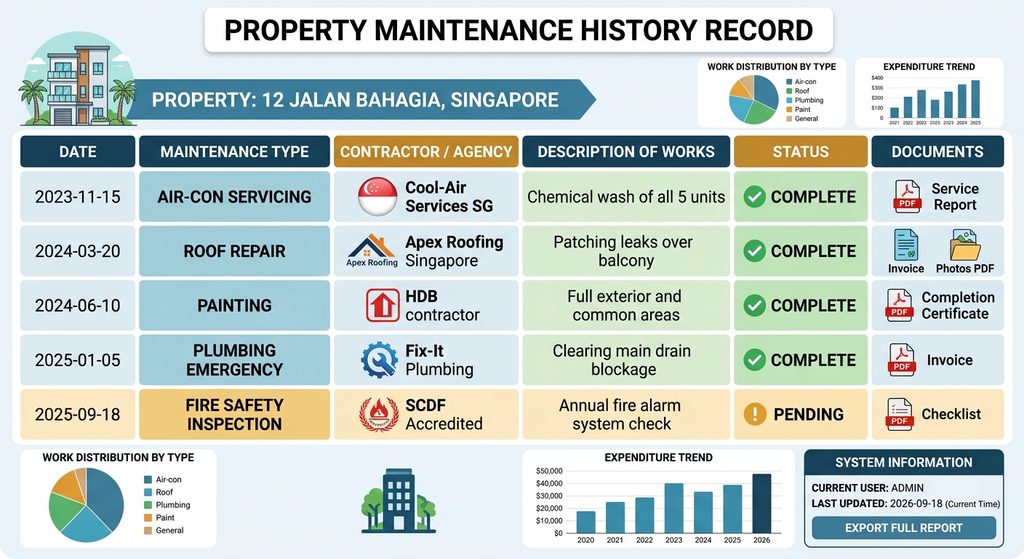
    Property Maintenance History Record

    This is the one that pays off years later. When your water heater fails, or your roof starts leaking, or your aircon compressor needs replacing — should you repair it again or finally replace it? That decision is so much easier when you can actually see how many times it’s been serviced, by whom, and how much you’ve already sunk into keeping it alive.

    Instead of digging through old texts and hoping you kept the invoice, your property’s full maintenance history lives in one place, tied to the property itself, not to your phone or your memory.

    DIY Building Maintenance Software: Why This Matters More for You Than a Condo Owner

    A condo owner has a council and an MA between them and the mess. You don’t. If you don’t build the system yourself, nobody’s going to build it for you — and the cost of not having one shows up later, as an asset you replaced too early, a vendor who overcharged you three times before you noticed, or a repair history you can’t produce when you’re selling the place.

    Basementgrid isn’t asking you to run a big operation. It’s just making sure that when you’re the one handling maintenance, you’re not doing it from memory.

    If you want to see how it’d work for your property, book a 15-minute demo and we’ll walk through it.

  • Digitalization of MCST Management: How Basementgrid’s 5 Roles Help

    Digitalization of MCST Management: How Basementgrid’s 5 Roles Help

    We looked at over 100 MCSTs in Singapore, and one thing kept showing up: the way a maintenance platform defines its roles decides whether the platform actually gets used. Most CMMS tools get this wrong for strata settings, and the gap shows up as unclosed work orders, unpaid vendors, and eventually a return to pen and paper.

    Here’s what we found, and how we built Basementgrid’s role structure around it.

    Why Digitalization of MCST Management Needs More Than a Typical CMMS

    In a normal maintenance department, or a company whose business is maintenance, the role structure is simple. An admin has full access to work orders and assets. He creates a work order and assigns it to a teammate, who has limited access. The teammate does the fix, or calls in a contractor, records proof of work, and closes the case.

    Budget approval sits outside the CMMS entirely. It happens in accounting software, where a director signs off once the amount crosses a threshold. Anything under that threshold gets done first, the vendor invoices after, and the manager submits it to accounting for payment.

    The CMMS itself just tracks asset failure history. An internal technician records completion and closes the case.

    This works because there’s always an internal technician in the loop. That assumption breaks down completely in a strata setting.

    Ghost Maintenance: The Barrier to Digitalization of MCST Management

    About half of Singapore’s MCSTs have fewer than 50 units. That means one managing agent, often juggling several other estates at the same time, running the whole show. There’s no budget to hire a technician to accompany every contractor and log the work.

    That’s how ghost maintenance happens: work gets done, but nobody records it in a system the MCST can actually trust.

    It gets worse when the CMMS itself is the obstacle. A contractor already juggling different CMMS tools across multiple estates isn’t going to climb a steep learning curve for one client. Work orders stay open, or never get logged at all. Eventually the MCST gives up on the software and the building manager, especially one trained the old-school way, goes back to pen and paper.

    Handing the vendor a “limited user” role and expecting diligent record-keeping doesn’t solve this. It just moves the failure point.

    More people are involved in an MCST repair than in a typical in-house maintenance job: admin, council, vendor manager, technician, accountant. More people means more places for a step to get skipped. Without a system that automates the handoffs between them, things fall through the cracks, and when they do, the blame lands on the building manager, whether or not the failure was actually his.

    Basementgrid’s 5 Roles: The Framework for Digitalization of MCST Management

    Digitalization of MCST Management

    Basementgrid’s role structure starts from a different assumption: every role has exactly one job to do at each stage of the maintenance cycle, and the process itself enforces compliance. No role in Basementgrid is ever asked to do more than two primary actions across the whole process. Simple, clear, and easy to follow, even for a first-time user.

    1. Admin (usually the building manager) Creates the work order and tracks its status. Can extend the role to an in-house technician if the MCST has one, or keep it limited to himself. No work order issued means no vendor gets paid, which is what keeps every job logged, especially the ones tied to payment.

    2. Approver (usually council members) Gets notified once a work order crosses the amount threshold and votes for or against it. For a closer look at how threshold-based approval works, see our guide on the MCST maintenance approval process.

    3. Vendor Manager Receives the approved work order and assigns a Vendor Technician to it.

    4. Vendor Technician Travels to site, clocks in on arrival, and completes the job, including GPS-verified photos and any custom form fields required for that job type.

    5. Admin verifies, Vendor Manager invoices, Approver reconciles Admin checks and verifies the completed work. Vendor Manager submits the invoice to the MCST for payment. Once payment is made offline, the Approver (usually an accountant) logs the payment and closes the loop.

    RolePrimary Action
    AdminIssues the work order, verifies completed work
    Approver (Council)Approve or reject above-threshold work
    Vendor ManagerAssigns technician, submits invoice
    Vendor TechnicianClocks in, completes the job with proof of work
    Approver (Accountant)Logs payment

    Why a Longer Process Delivers Real Digitalization of MCST Management

    This process has more steps than a typical CMMS. That’s deliberate. Every role is accountable for one action, and every action is designed to be simple enough that if you know how to use WhatsApp, you can use Basementgrid.

    The result: work that needs doing gets logged, work that’s completed gets verified with proof, and payment gets reconciled against actual work done. No ghost maintenance, no vendor chasing payment nobody agreed to, no manager stuck re-explaining a CMMS to a contractor who’s already juggling three others.

    That’s the difference between a maintenance tool built for internal teams and one built for how MCSTs actually operate.

    For a full breakdown of how each role works inside the platform, see our help center guide: Understanding Roles: Administrator, Collaborator, and Requester.

  • The iCondo Lesson: Why Operations Software Fails Where Community Apps Succeed

    The iCondo Lesson: Why Operations Software Fails Where Community Apps Succeed

    Singapore has spent years pushing the built environment towards digitalisation. The government’s Smart Nation initiative champions drones, sensors, and automation to make city infrastructure more efficient, and BCA’s Integrated Digital Delivery (IDD) programme pushes the same digital-first thinking across the building lifecycle, from design through to asset management. On paper, MCSTs today have no shortage of CMMS options to choose from.

    And yet adoption is close to zero. Ask most council members or building managers, and their CMMS either sits unused after the first few months, or never got past the pilot stage. The only category of app that has genuinely caught on with residents is community-focused apps like iCondo — and those have nothing to do with actually running the estate’s operations. They handle bookings and announcements, not maintenance, vendors, or compliance.

    That gap between “software exists” and “software gets used” isn’t a technology problem. It’s a design problem. Here’s how MCSTs actually work. When council members engage a managing agent, and if the budget allows, they’ll want someone onsite to attend to occupants directly. So they add headcount — anywhere from just a building manager, to an admin staff and a technician (handyman). How much they can add usually comes down to the maintenance funds contributed by subsidiary proprietors (SPs). Bigger estates, bigger budgets, more headcount.

    But the heavy, important work — a lift breakdown, a leaking rooftop — is done by vendors. So the MA’s real job is managing these vendors professionally and promptly. And this is where most CMMS implementations fall apart.

    Problem 1: CMMS is built for internal staff, not vendors — even for MAs like Smart Property

    When an MA implements a CMMS, vendors often don’t follow it. Most of these systems aren’t mobile-first, and they’re designed with internal staff in mind — which means they ask for more information than a vendor technician actually needs or wants to fill in. The learning curve is too steep for vendor technicians and vendor managers, and that’s usually where CMMS adoption quietly fails.

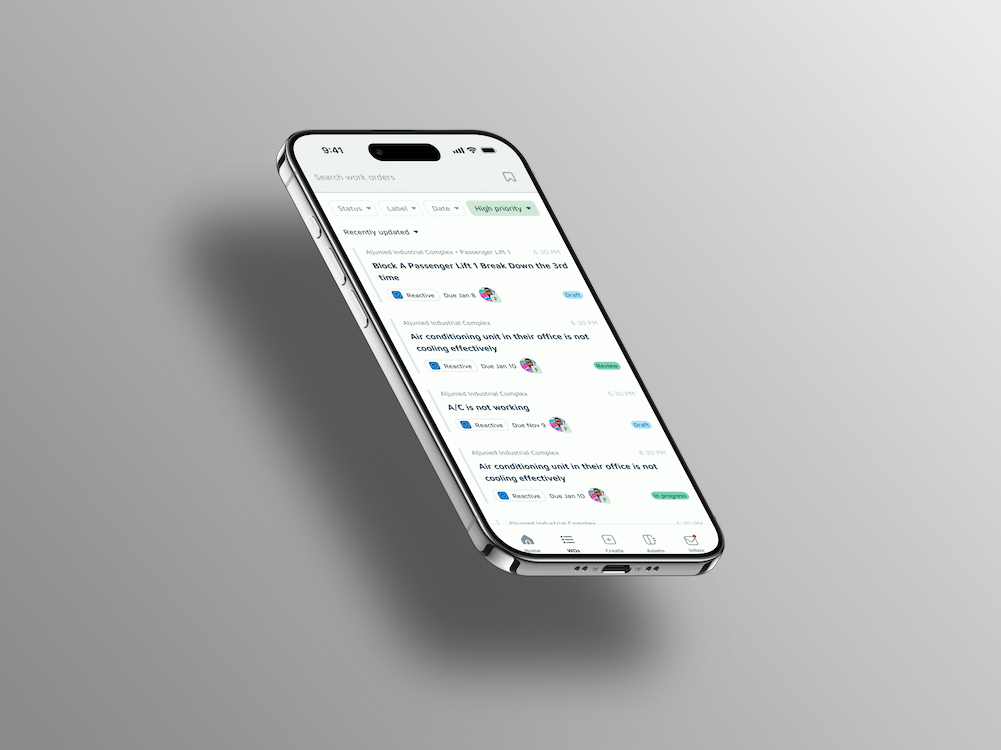
    How Basementgrid solves this: We split vendor managers and vendor technicians into two distinct roles, each with only what they need to do — and a single primary action button that tells them exactly what’s required next. Basementgrid also works as field service management software for vendor managers themselves. They carry one verified profile across every estate they work in, so they’re not learning a new system each time — just repeating the same procedure somewhere else. Mobile-first, role-specific, and structured so no one can skip a step in the maintenance process.

    Problem 2: Building managers have no leverage over vendors

    BMs usually start out enthusiastic when a CMMS is launched. But when vendors don’t cooperate, that enthusiasm fades fast, and the software gets abandoned — a pattern we’ve written about before in why building managers can’t put maintenance on autopilot. The real issue is leverage: BMs don’t have much power over vendors, because the supply of vendors willing to do the work at a reasonable price is limited. Unlike a large corporation dealing with vendors, the balance of power here tilts toward the vendor, not the buyer.

    How Basementgrid solves this: We built payments directly into the maintenance process. Invoices are submitted through Basementgrid as part of the workflow, not handed off to a separate finance process. This does two things. First, it gives vendor managers a reason to follow the procedures we require, because completing them is the path to getting paid. Second, it gives building managers instant visibility into payment status. The two departments stop working in silos — and for the MAs who outsource accounting (about half of them do), everyone knows immediately whether a job has been invoiced, paid, or stuck.

    Problem 3: Council members are more than “requestors”

    Most CMMS platforms are built for the building management team and technicians, which means council members are treated as just another requestor in the system. But that undersells their role. The maintenance health of the estate, and its statutory compliance, ultimately rests on their shoulders — even when an MA is engaged. They can’t hand off responsibility entirely if a vendor, MA, or technician drops the ball. The same goes for the funds they’re accountable for, whether management funds or sinking funds.

    How Basementgrid solves this: We keep it simple. Council members only need to give majority approval when maintenance or repair costs exceed a set threshold, and they have view access to all work orders at all times. If they want an overview of the estate, they can generate reports — but it’s optional, not mandatory. We call this role “Approver,” and it does double duty: it also keeps building managers accountable, since they know council members can see what’s happening in the estate at any time.


    Try it for yourself

    To be clear, Basementgrid isn’t trying to replace iCondo, and it doesn’t need to. iCondo does community well — bookings, announcements, keeping residents in the loop. We do operations — maintenance, vendors, payments, compliance. Different jobs, different users, and there’s no reason an estate can’t run both side by side. The problem was never that community apps exist. It’s that operations software never solved the vendor problem, so it never got the chance to matter the way iCondo did.

    Whether you’re a council member, a managing agent, or a subsidiary proprietor who owns just a small fraction of the estate, you can download the app here and reach out if you need a hand getting started.

    We’re always happy to partner with managing agents looking to integrate Basementgrid into their operations, help council members set it up and customise it for their estate, or support onboarding for building managers and vendors. It’s the same spirit behind Savills’ partnership with iCondo on the community side — we’d like to be that partner for MAs on the operations side.

    Because at the end of the day, if the process is broken, changing the people running it won’t fix anything.