
Category: Maintenance & Repair

  • Running Your Own Building’s Maintenance Without Losing Your Mind

    Running Your Own Building’s Maintenance Without Losing Your Mind

    If you own a landed home or a shophouse, you don’t have an MCST or a managing agent handling maintenance for you. You are the managing agent. Every leaking pipe, every aircon servicing, every contractor who shows up at your gate — you’re the one coordinating it, remembering it, and paying for it.

    Most owners end up doing this through a mix of WhatsApp chats, paper receipts, and memory. It works, until it doesn’t — usually right when you need to remember something from two years ago and can’t.

    Here’s how Basementgrid helps, even without a council or an MA in the picture.

    Verified Contractor App Singapore: Know Who’s Actually in Your Building

    Verified Contractor

    Anyone can call themselves a contractor. Basementgrid only lets UEN-verified vendors take on jobs, so before someone’s doing electrical work or roof repairs on your property, there’s a real registered company behind them, not just a phone number a neighbour passed along.

    Every job also gets logged against that vendor. If the same “handyman” keeps quoting differently each time, or a company’s work keeps failing, you’ll actually be able to see that pattern instead of relying on your own memory of who did what.

    Shophouse Maintenance Tracking: Stop Paying for Work That Quietly Didn’t Happen

    This is the part most self-managing owners get burned by eventually. You pay a vendor for a “routine service” or a repair, and there’s no real way to confirm the work was done properly — or at all — beyond taking their word for it. We’ve written before about how ghost maintenance and falsified invoicing quietly drain maintenance budgets, and it’s just as easy to fall victim to without a council watching over the books.

    With Basementgrid, every job is tied to a work order and a sign-off, so there’s a record that matches the invoice to the actual work. It’s a lot harder for a vendor to bill you for a job that was rushed, skipped, or never fully completed when there’s a paper trail expected on both ends.

    Property Maintenance History Record: Build the Repair-or-Replace Case for Yourself
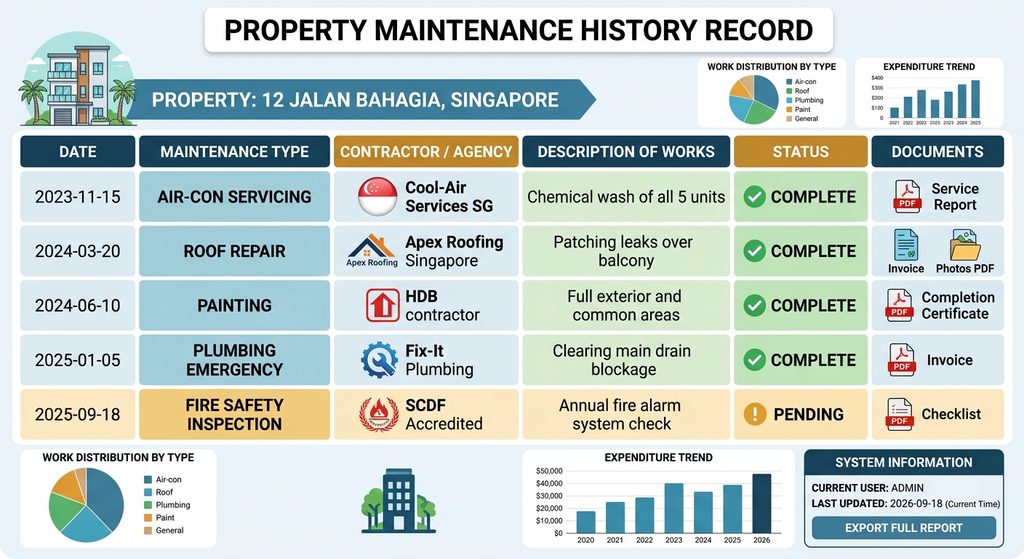
    Property Maintenance History Record

    This is the one that pays off years later. When your water heater fails, or your roof starts leaking, or your aircon compressor needs replacing — should you repair it again or finally replace it? That decision is so much easier when you can actually see how many times it’s been serviced, by whom, and how much you’ve already sunk into keeping it alive.

    Instead of digging through old texts and hoping you kept the invoice, your property’s full maintenance history lives in one place, tied to the property itself, not to your phone or your memory.

    DIY Building Maintenance Software: Why This Matters More for You Than a Condo Owner

    A condo owner has a council and an MA between them and the mess. You don’t. If you don’t build the system yourself, nobody’s going to build it for you — and the cost of not having one shows up later, as an asset you replaced too early, a vendor who overcharged you three times before you noticed, or a repair history you can’t produce when you’re selling the place.

    Basementgrid isn’t asking you to run a big operation. It’s just making sure that when you’re the one handling maintenance, you’re not doing it from memory.

    If you want to see how it’d work for your property, book a 15-minute demo and we’ll walk through it.


  • Why Defects Liability Period Tracking Matters: Lessons from a 10-Year Condo Dispute

    Why Defects Liability Period Tracking Matters: Lessons from a 10-Year Condo Dispute

    Canberra Residences got its TOP in June 2013. Thirteen blocks, 320 units, the usual condo amenities. Residents started finding problems almost immediately: floor tiles popping up, a kitchen cabinet collapsing off the wall above a stove, sagging cabinetry. Normal enough for a new build, and exactly the window the Defects Liability Period exists for — which is why defects liability period tracking, done properly from day one, matters far more than most councils realize.

    It’s 2026. The MCST is now suing the main contractor over an alleged breach of a settlement agreement that was signed in September 2020, itself the outcome of an earlier lawsuit filed back in 2019. The contractor says the repainting was done by January 2023. The MCST’s statement of claim, filed in 2025, says paintwork is still defective and incomplete, along with rusting steel fixtures and shattered balcony glass. The contractor’s defense on some of it: fair wear and tear, poor maintenance by the MCST, maybe damage by third parties.

    So somewhere between “resident’s cabinet fell off the wall in 2013” and “we’re back in court in 2025,” thirteen years happened. Two lawsuits. One settlement agreement that apparently didn’t settle anything. And a genuinely unanswerable question hanging over the whole thing: which of these items are actually still defects, and which have quietly become wear and tear because nobody closed them out when they should have?

    That’s the part that should worry every council out there, not the lawsuit itself.

    Contractor Delay Tactics Cut Both Ways

    Contractors dragging their feet on defects isn’t news. Cashflow’s tight, defect rectification is unglamorous, and if you can stretch it out long enough, some claims age out or get muddied by time. That’s a known playbook, and it’s exactly why the article, and lawyers who write about construction disputes, keep flagging “delay tactics” as a real strategy, not paranoia.

    But a decade of delay creates cover on both sides. A wall crack reported in 2013 as a defect is unambiguous. The same crack, unaddressed and reported again in 2023 alongside years of normal weathering, is now genuinely disputable. Was it always a defect that never got fixed, or did it start as minor settlement cracking and become a maintenance issue somewhere along the way? Nobody can answer that anymore, because nobody photographed it, timestamped it, or tracked its status.

    That ambiguity doesn’t just help the contractor. It also tempts the other side. An MA working under MCST instruction, staring down a mountain of building issues and years of frustration, has every incentive to fold “should have been maintained” items into the defects claim, especially once things go legal and it becomes an all-or-nothing negotiation. The contractor calls it opportunistic. The MCST calls it long-overdue accountability. Both arguments have some truth to them, and the reason neither side can prove their version cleanly is the same: ten years of undocumented back-and-forth.

    This is what happens whenever defects tracking is allowed to lapse. It’s not just that repairs get delayed. It’s that the entire category collapses. Defect vs. wear-and-tear stops being a factual question and becomes a legal one, decided by whoever has better documentation, or failing that, whoever can afford to outlast the other in court.

    Why MCST Defect Tracking Breaks Down Without a System

    Realistically, nobody sat down in 2013 and decided to let this run for a decade. It happened the way these things always happen:

    • A defect gets reported informally, maybe a WhatsApp message to the MA or a call to the building manager.
    • It gets “handled,” sort of, but there’s no structured record of when it was reported, what was promised, or when it was actually closed.
    • Council turnover happens. Volunteers rotate out every year or two. Institutional memory about which defects are open and which are resolved walks out the door with them.
    • The MA changes, which happens more often than anyone likes to admit in this industry, and the new MA inherits a filing cabinet, not a system.
    • By the time anyone tries to reconstruct the defects history for a legal claim, they’re relying on emails, old minutes, and residents’ memories of what fell off which wall in which year.

    None of this is any single party’s fault. It’s what happens by default when defect tracking lives in inboxes and meeting minutes instead of in a system built for it.

    How Defects Liability Period Tracking Software Prevents This

    Building Managers Essential Tools

    This is the exact failure mode Basementgrid’s defect tracking module exists for, so it’s worth being specific rather than just saying “digitalize it.”

    Every defect gets a permanent, timestamped record from day one. Reported date, photos, description, assigned vendor, and every status update logged against it. Not a WhatsApp thread that gets deleted when someone changes phones.

    The DLP clock is visible, not assumed. Council and MA can see at a glance which defects were reported inside the Defects Liability Period and which weren’t, so “was this ever actually a defect claim” stops being a debate reconstructed years later from memory.

    Defects don’t get closed by silence. A defect stays open until someone actively marks it resolved, with evidence attached. No more items quietly falling off the list because nobody chased them for two years.

    The record survives MA and council turnover. Because the data belongs to the MCST’s workspace, not to whichever MA happens to be managing it that year, a new MA or a new council inherits the full history on day one, not a stack of paper and secondhand accounts.

    Defect vs. wear-and-tear becomes a documented fact, not a courtroom argument. If a crack was reported and photographed in 2013 and never closed, there’s no ambiguity about whether it’s old damage or ongoing deterioration ten years later. The timeline speaks for itself.

    None of this stops a contractor from dragging its feet, and it wouldn’t have stopped this particular dispute from ending up in court. What it does is take away the fog that makes ten-year delays survivable for whoever’s slow-walking a claim, and it takes away the temptation on the other side to pad a claim once things get adversarial. A clean, contemporaneous record is bad for stalling and bad for overreach in equal measure. That’s the point.

    Fix the process, not the people. Set it up once, and let the process manage the people.

  • Digitalization of MCST Management: How Basementgrid’s 5 Roles Help

    Digitalization of MCST Management: How Basementgrid’s 5 Roles Help

    We looked at over 100 MCSTs in Singapore, and one thing kept showing up: the way a maintenance platform defines its roles decides whether the platform actually gets used. Most CMMS tools get this wrong for strata settings, and the gap shows up as unclosed work orders, unpaid vendors, and eventually a return to pen and paper.

    Here’s what we found, and how we built Basementgrid’s role structure around it.

    Why Digitalization of MCST Management Needs More Than a Typical CMMS

    In a normal maintenance department, or a company whose business is maintenance, the role structure is simple. An admin has full access to work orders and assets. He creates a work order and assigns it to a teammate, who has limited access. The teammate does the fix, or calls in a contractor, records proof of work, and closes the case.

    Budget approval sits outside the CMMS entirely. It happens in accounting software, where a director signs off once the amount crosses a threshold. Anything under that threshold gets done first, the vendor invoices after, and the manager submits it to accounting for payment.

    The CMMS itself just tracks asset failure history. An internal technician records completion and closes the case.

    This works because there’s always an internal technician in the loop. That assumption breaks down completely in a strata setting.

    Ghost Maintenance: The Barrier to Digitalization of MCST Management

    About half of Singapore’s MCSTs have fewer than 50 units. That means one managing agent, often juggling several other estates at the same time, running the whole show. There’s no budget to hire a technician to accompany every contractor and log the work.

    That’s how ghost maintenance happens: work gets done, but nobody records it in a system the MCST can actually trust.

    It gets worse when the CMMS itself is the obstacle. A contractor already juggling different CMMS tools across multiple estates isn’t going to climb a steep learning curve for one client. Work orders stay open, or never get logged at all. Eventually the MCST gives up on the software and the building manager, especially one trained the old-school way, goes back to pen and paper.

    Handing the vendor a “limited user” role and expecting diligent record-keeping doesn’t solve this. It just moves the failure point.

    More people are involved in an MCST repair than in a typical in-house maintenance job: admin, council, vendor manager, technician, accountant. More people means more places for a step to get skipped. Without a system that automates the handoffs between them, things fall through the cracks, and when they do, the blame lands on the building manager, whether or not the failure was actually his.

    Basementgrid’s 5 Roles: The Framework for Digitalization of MCST Management

    Digitalization of MCST Management

    Basementgrid’s role structure starts from a different assumption: every role has exactly one job to do at each stage of the maintenance cycle, and the process itself enforces compliance. No role in Basementgrid is ever asked to do more than two primary actions across the whole process. Simple, clear, and easy to follow, even for a first-time user.

    1. Admin (usually the building manager) Creates the work order and tracks its status. Can extend the role to an in-house technician if the MCST has one, or keep it limited to himself. No work order issued means no vendor gets paid, which is what keeps every job logged, especially the ones tied to payment.

    2. Approver (usually council members) Gets notified once a work order crosses the amount threshold and votes for or against it. For a closer look at how threshold-based approval works, see our guide on the MCST maintenance approval process.

    3. Vendor Manager Receives the approved work order and assigns a Vendor Technician to it.

    4. Vendor Technician Travels to site, clocks in on arrival, and completes the job, including GPS-verified photos and any custom form fields required for that job type.

    5. Admin verifies, Vendor Manager invoices, Approver reconciles Admin checks and verifies the completed work. Vendor Manager submits the invoice to the MCST for payment. Once payment is made offline, the Approver (usually an accountant) logs the payment and closes the loop.

    RolePrimary Action
    AdminIssues the work order, verifies completed work
    Approver (Council)Approve or reject above-threshold work
    Vendor ManagerAssigns technician, submits invoice
    Vendor TechnicianClocks in, completes the job with proof of work
    Approver (Accountant)Logs payment

    Why a Longer Process Delivers Real Digitalization of MCST Management

    This process has more steps than a typical CMMS. That’s deliberate. Every role is accountable for one action, and every action is designed to be simple enough that if you know how to use WhatsApp, you can use Basementgrid.

    The result: work that needs doing gets logged, work that’s completed gets verified with proof, and payment gets reconciled against actual work done. No ghost maintenance, no vendor chasing payment nobody agreed to, no manager stuck re-explaining a CMMS to a contractor who’s already juggling three others.

    That’s the difference between a maintenance tool built for internal teams and one built for how MCSTs actually operate.

    For a full breakdown of how each role works inside the platform, see our help center guide: Understanding Roles: Administrator, Collaborator, and Requester.

  • MCST Maintenance Approval Process: Managing 14 Bosses on WhatsApp

    MCST Maintenance Approval Process: Managing 14 Bosses on WhatsApp

    In a corporate setting, spending approval is simple. Above a certain threshold, a director signs off. One signature, one accountable person, and the process moves fast.

    MCSTs don’t work like this. Council members are volunteers, not executives with signing authority baked into their job description. Even when a spending threshold is set, crossing it doesn’t trigger one signature. It triggers a vote, and the vote needs a majority.

    So in practice, here’s what happens. The building manager, employed by the managing agent, spots a repair, posts it in the WhatsApp group, and asks the council for permission to fix it. Some building managers actually like this — it’s a chance to stay visible, keep the council in the loop, and hear their opinions before spending their money.

    Call it relationship management or call it politics, it doesn’t change the underlying problem. Every council member carries equal vote weightage, decisions happen informally over WhatsApp, and there’s no clean record of who approved what and when. The result is a slow, inconsistent approval process that delays repairs and leaves residents unhappy.

    The Real Challenge: Managing Volunteers, Not Employees

    Here’s the question every building manager eventually has to answer: how do you run a maintenance approval process when your “bosses” are volunteers with different education levels, different work backgrounds, and wildly different comfort levels around spending money?

    Managing one boss is hard enough. A council can have up to 14 members. Getting alignment from all of them, every time, is close to impossible if the only tool you have is a group chat.

    What This Indecision Actually Costs

    It’s easy to write this off as a minor inconvenience, but the cost shows up in places that matter. A leaking pipe or a faulty lift doesn’t wait for 14 people to reach consensus on WhatsApp. While the group chat scrolls past unanswered questions and half-formed opinions, the fault sits there, sometimes getting worse and more expensive to fix.

    Residents don’t see any of the back-and-forth happening behind the scenes. All they see is a maintenance request that’s been open for two weeks with no update. That’s when the complaints start, and building managers end up absorbing frustration for a delay they didn’t cause. The approval process, not the building manager, is usually the real bottleneck.

    There’s also a quieter cost: accountability. When approval happens through scattered WhatsApp messages, thumbs-up emojis, and the occasional “ok go ahead” buried in a long thread, there’s no clean way to reconstruct who agreed to what months later. If a council member disputes an invoice at the AGM, or a new MA takes over and has no idea why a job was approved, the trail is gone. That’s a governance risk MCSTs can’t really afford, especially with rising scrutiny around how sinking funds and maintenance budgets are spent. It’s part of a bigger pattern we’ve written about in Fixing Strata Management in Singapore: most of these problems trace back to a lack of structured process, not a lack of effort from the people running the estate.

    How the Approval System on Basementgrid Fixes This

    MCST Maintenance Approval Process

    The workflow is simple. A building manager creates a work order for every repair. The work order link gets shared in the same council chat group they’re already using, so nothing about the relationship or the conversation changes. The repair is now on record, and the informal discussion can continue exactly as before, right there in the chat.

    The difference shows up once an amount is entered. If it crosses the threshold, the system automatically notifies council members and collects approvals. Once the required minimum is reached, the work order is issued to the vendor. No manual chasing, no ambiguity about who said yes.

    This solves two problems at once.

    First, it closes the legality gap. Any spend above the threshold now has documented majority approval before the vendor is engaged, which is exactly what BMSMA compliance requires.

    Second, it protects the informal working relationship building managers rely on. The conversation still happens in the chat group, the amount can still be discussed and adjusted freely, and none of that flexibility disappears. It’s only locked in once the work order is actually issued.

    Every action is timestamped, so at any point, it’s clear who approved what and who’s sitting on a decision. For council members, especially the bank signatories who ultimately sign the cheques, this means no more surprise invoices at month end. If an amount was approved, they know, because they were part of the majority that approved it. The only way a large invoice catches anyone off guard is if the building manager skipped creating the work order in the first place.

    The Bottom Line

    None of this requires council members to change how they behave, and it doesn’t ask building managers to give up the relationship-building that comes with running things through the group chat. It just puts a paper trail underneath conversations that used to disappear into a scroll of unread messages. When approval is timestamped, threshold-triggered, and tied to a specific work order, nobody has to guess who’s holding things up, and nobody gets blindsided by an invoice they don’t remember approving.

    That’s the difference between managing 14 bosses by chasing them, and managing them with a system that does the chasing for you.