Tag: work order

  • Where Did the Money Go? Your Work Order Should Know

    A work order that only records what, where and how a job was done isn’t much use. It’s just a document. So we made the work order do more: approvals, proof of work and payments all happen inside it.

    Who Approved This Spending?

    Work Order Approval MCST

    Many MCSTs need a majority vote before spending above a certain amount. Owners contribute to the maintenance fund every month, and they scrutinise how it’s used. Every dollar needs a proper record, or owners will get upset when they find out about misuse.

    On Basementgrid, a work order is only issued to the vendor once the required votes are in.

    There’s one catch. If no work order is created, the approval step is bypassed, and no software can record spending that never entered the system. That’s why we built payment into the app as well.

    How Was It Paid?

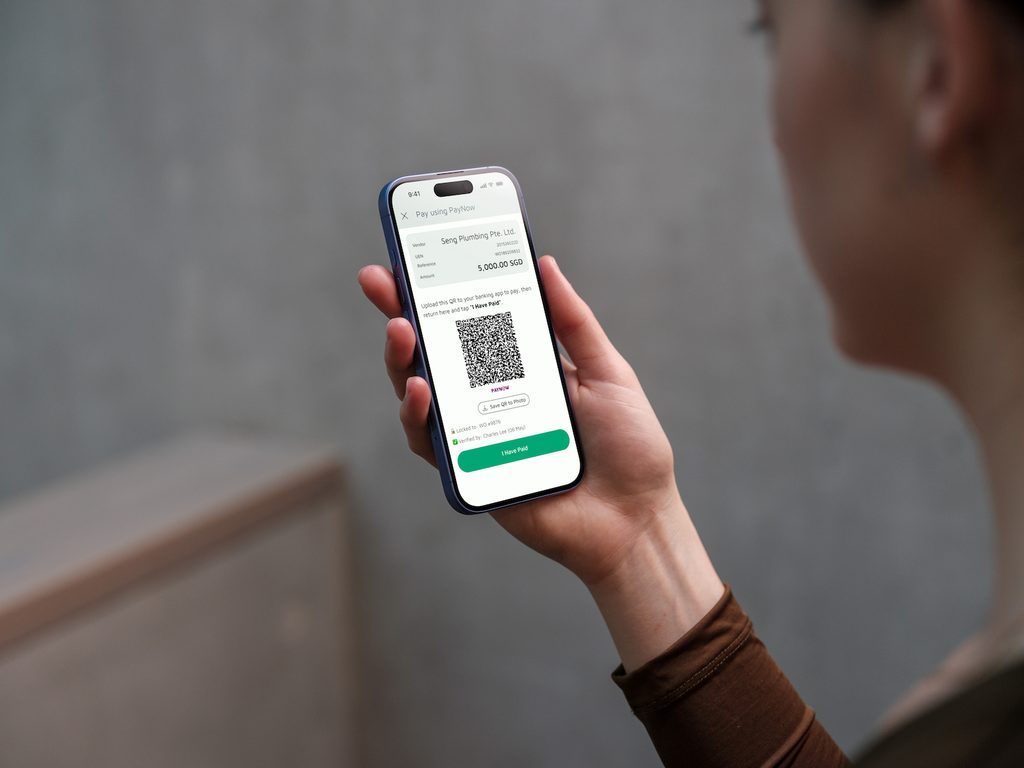
    PayNow QR code Vendor Payment

    We looked at how most organisations actually pay, and built a Billing stage around it. Vendors upload their invoice to the matching work order. From there, you can either:

    • pay directly from the app, using a unique PayNow QR code that carries the work order amount and the vendor’s UEN, and scan it in your bank app, or
    • download the maintenance ledger, tap the work order link to check the proof of work, then have the accounts team make a batch payment.

    Either way, the work order exists and the approvals are logged, so the spending is accounted for. It isn’t a pile of WhatsApp screenshots and emails pieced together by managers after the fact.

    To complete the Billing stage, the payer updates the record or the manager marks the work order as paid. That updates the maintenance ledger, which is what you’ll rely on for audits later.

    Was the Work Actually Done?

    Proof of work is submitted in the app and kept permanently in the cloud, so it’s accessible to everyone involved. It doesn’t sit in one person’s WhatsApp chat or email inbox. Each submission is GPS verified and timestamped, so you can show subsidiary proprietors (SPs) that the work was completed on site within a particular period.

    Looking after your estate’s maintenance doesn’t need you at a desk anymore. You can do it from your couch, or on the MRT between everything else on your schedule.


    Not sure how your MCST handles this today? Book a demo and we’ll help you work out where the gaps are.


  • The Light Stayed Broken for 3 Weeks. Then a Council Member Mentioned It.

    Daniel is a made-up owner, but if you’ve lived in a condo for a few years, you probably know him.

    Daniel’s corridor light had been flickering for three weeks. He’d reported it to the MA twice and got “noted” both times. Then his neighbour, who sits on the MCST council, mentioned it in passing, and the electrician showed up two days later.

    Daniel noticed that. Council members get answered faster, because the MA reports to the council. Work requests get looked at, the guards pay attention, and a dispute with a neighbour gets taken seriously.

    So when the AGM came around and someone asked for volunteers, he thought about putting his name down. Then he thought about everything he’d heard. The meetings are at night and run for hours. Every decision upsets someone. A neighbour who didn’t get his way may write nasty messages in the estate chat, and a few estates have even ended up in court. He kept his hand down. Most owners do the same.

    Here’s how it could have gone if Daniel had joined and the work lived in an app.

    The council meetings. Instead of booking the function room every month, the council meets on Zoom for the things that need discussion. Quotes and payments that used to wait for a meeting get approved in Basementgrid whenever Daniel has a minute, like on the MRT. The call is recorded, an AI tool drafts the minutes from the transcript, and the secretary signs off. The meetings get shorter and happen less often.

    MCST council meetings

    The money. Daniel’s biggest worry was signing off on something he didn’t fully understand. So the council sets the approval threshold to zero. The MA can’t start any job until the council pre-approves it on Basementgrid. Payment goes through a QR code generated by Basementgrid, tied to the approved amount and the vendor’s UEN, so the amount and the payee can’t change after approval.

    The proof. Before a payment, he doesn’t have to take anyone’s word that the job was done. The vendor clocks in with GPS verification and submits photos taken at the location, with no uploads from the photo library. The BM reviews the work and accepts it before the payment goes out.

    The neighbours. Remember the flickering light? Residents can now report faults themselves in Basementgrid, a bit like the OneService app for HDB estates. Every report is time-stamped, so nothing depends on someone remembering to pass it on. If a job stalls, Daniel can see where it’s stuck and who’s holding it up, and he can ask about it without guessing.

    The quotes. Two quotes for the same lift repair arrive, and they don’t line up. One lists parts and labour separately, and the other has a single lump sum. The AI quote check (coming soon) summarises each quote and flags the items worth questioning. Daniel still makes the call, but he’s no longer comparing apples to oranges by himself.

    The backlash. Eventually a neighbour complains, as one always does. This time Daniel doesn’t have to rely on his memory of a meeting eight months ago. The record shows who approved the job, when, which quote it was based on, and what proof of work came back. He can reply with facts. Some people will still be unhappy, but he isn’t defending himself from scratch.

    Being on the council still takes time, and you’ll still make calls that not everyone likes. But much of the tracking, chasing, and record keeping that made the role feel thankless can now sit in an app. These days you can book a ride or a stay from your sofa because startups took over the tedious parts. Hopefully Basementgrid can join that list, so you can manage your estate from your phone.


    Try it on one work order

    Daniel is made up, but the setup is real. A council member or building manager can create a workspace in about 3 minutes by setting the approval threshold and inviting the other council members. After that, run one work order from start to finish with a vendor you already use, and see how it feels before changing anything else.

    Fix the process, not the people.

  • Tripartite in Action: How Three Parties Get an Estate Maintained

    Tripartite in Action: How Three Parties Get an Estate Maintained

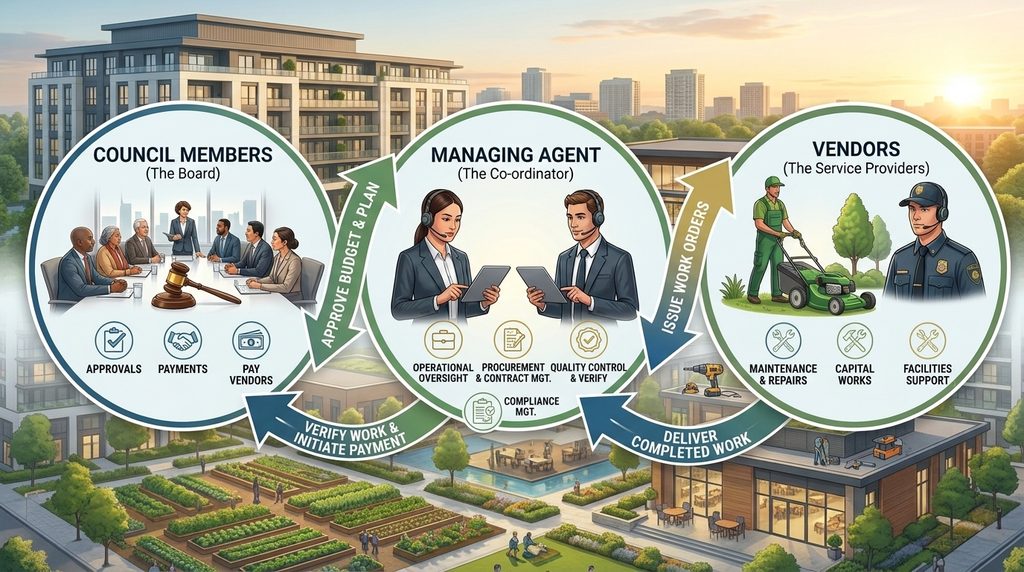
    Every MCST has the same three parties involved in getting a job done: the Managing Agent (MA), the council members, and the vendors. The MA coordinates, the council decides and approves the spending, and the vendor does the work. None of them can finish a job alone, and each one is waiting on the other two at some point.

    A Collaboration Tool for Estate Management, Not Just a Documentation Tool

    That’s why Basementgrid focuses on the actions each party has to take, and not only on documentation and record keeping. A fault gets reported, someone checks it, the vendor sends a quotation, the council approves, the work gets done, and the MA verifies it. Every step has an owner, and the app shows that person what they need to do next. We’re a collaboration tool first. The records are a result of people doing their part, not the goal.

    How an MCST Work Order Moves Between MA, Council and Vendor

    Take a leaking pipe in the basement carpark. The building manager logs the fault and does an initial check. The MA picks a vendor and asks for a quotation. The vendor sends it, linked to that fault check. The council reviews it with the photos and the evaluation in front of them, and approves. The vendor does the work and uploads proof from site. The MA verifies it and closes the job. Nobody has to dig through emails or scroll a chat group to find out where things stand.

    We went this way because of three problems we kept running into.

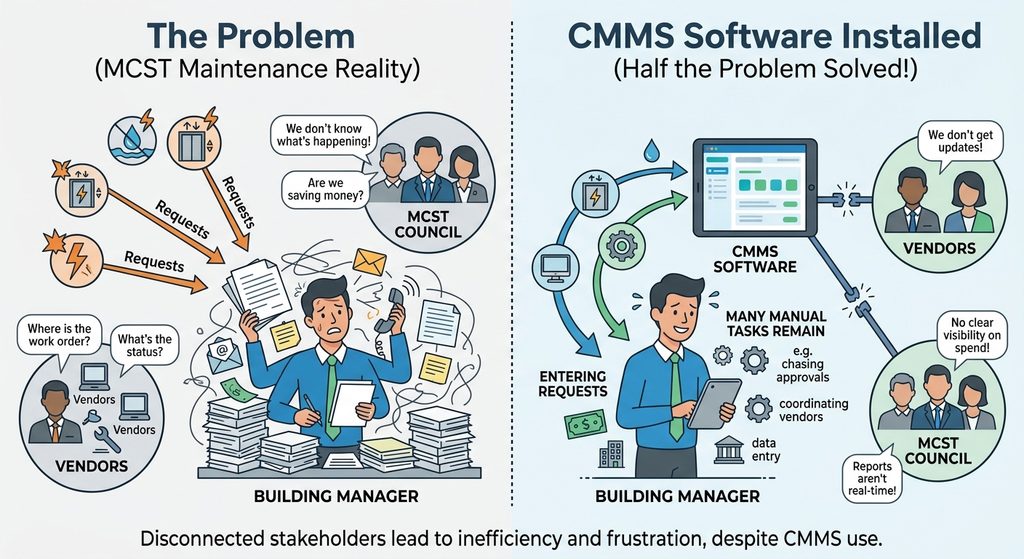
    Why CMMS Software Only Solves Half the Problem for MCSTs

    CMMS Software Limits

    Most of them are built for the MA, the building manager and an internal tech team. Very few MCSTs have the budget for an internal tech team. So the building manager ends up doing extra work to feed the system, while the vendors and council aren’t in it at all. After a while nobody uses it, and the team is back to spreadsheets and chat groups.

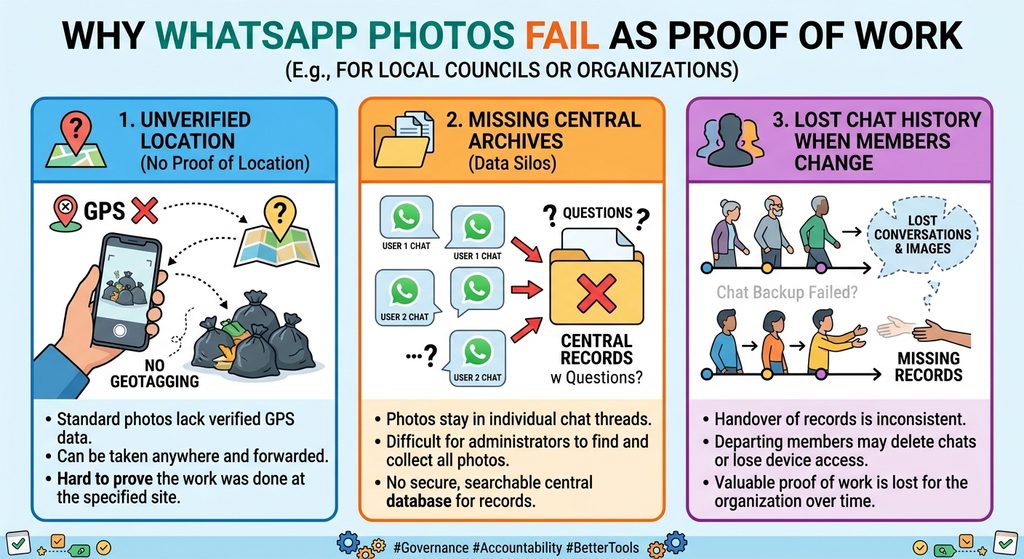
    Why WhatsApp Photos Fail as Proof of Work

    WhatsApp Photos as Proof of Work

    They aren’t GPS verified, so there’s no way to confirm where a photo was taken. They can’t be archived for future reference. And when the MA or council members change, the photos disappear with the old phones and chat groups. A year later, a new council can’t see what was done, when, or by whom. That matters when you’re deciding whether to repair something again or replace it. We wrote more about why vendor proof of work and record keeping keep falling through.

    Why MCST Maintenance Works Get Delayed

    Most MCSTs need a majority vote for amounts above the threshold, so approvals take time. Vendors forget to send the quotation. And when a quotation arrives by email with no reference to the original fault check and initial evaluation, the MA can’t tell what it’s for and has to chase. None of these is anyone being lazy. They’re gaps between people who all have other things to do.

    Shared Responsibility Between MA, Council Members and Vendors

    We don’t think any one party should carry all the record keeping or photo taking. Everyone depends on everyone else, so everyone shares the responsibility. The vendor takes the photos on site, and the MA reviews the work and approves it. The council can then make payment with confidence, because they can see the MA’s approval alongside the proof of work. When the burden is spread out, no single person becomes the bottleneck, and nobody is stuck cleaning up after the others. This is also why council members often take the blame when requests fall through. The required actions are mapped into the work process in the app, so nobody has to remember whose turn it is. See how it works.

    Estate Maintenance Is a Feedback Loop, Not a Linear Process

    MCST management work process loop

    Maintenance also doesn’t end. A lift gets serviced, then it needs servicing again. A defect gets fixed, then something else shows up. A linear process that starts with a fault and stops at payment doesn’t fit that, so we built the work process as a feedback loop. What happens on one job, such as the history, the quotation and the proof of work, feeds into the next one. Over time the estate builds up a record that belongs to the MCST, not to whoever happens to be managing it that year.

    Fix the Process, Not the People

    When a job goes wrong, the usual reaction is to blame the MA, the vendor, or the council. Most of the time the real problem is that nobody set up the steps clearly, and each party assumed someone else would handle it. Fix the process, not the people.

    Ready to try it with your MCST?

    Create a workspace and invite your MA, council members and vendors, or book a demo and we’ll walk you through a real job from fault report to sign-off.

  • Set Up in 3 Minutes, Paid in One Workflow: Running Your First Work Order on Basementgrid

    Set Up in 3 Minutes, Paid in One Workflow: Running Your First Work Order on Basementgrid

    Most software for building maintenance asks you to change how you work before it does anything for you. You import data, configure modules, train the team, and three months later you’re still not sure it’s running.

    Basementgrid works the other way. You can start with the vendor you already use, on the next job that comes up. Here’s what that looks like, from setting up your workspace to getting the vendor paid.

    Step 1: Set up your workspace (about 3 minutes)

    Basementgrid New Workspace Onboarding

    A building manager or a council member can create the workspace. You enter the estate details and set the approval threshold, which is the amount above which a work order needs council sign-off. Then you invite the council members.

    That’s the whole setup. You don’t need to load your assets or build your vendor list first. You can add those as you go.

    Step 2: Create your first work order

    Create a work order for whatever needs doing, invite your existing vendor, and assign the job to them. Your vendor doesn’t need to be on Basementgrid already, and they don’t pay to use it.

    If the amount is above your threshold, the work order waits for council approval. Council members get the request, see the amount and the vendor, and approve it. Nobody has to chase anyone on WhatsApp to find out whether the job was authorised.

    Step 3: The vendor dispatches a technician

    Once the work order is issued, the vendor manager invites their technician and dispatches them to the job. The vendor runs their own side, so the building manager doesn’t have to coordinate who is turning up.

    Step 4: The technician does the job, and proves it

    GPS-verification check in

    When the technician arrives on site, they clock in with GPS verification. They do the work, take photos that are also GPS verified, write a work summary, and submit the form.

    The photos have to be taken on the spot, so you’re not relying on a picture sent later that could be from anywhere. The building manager gets a record of who was there, when, and what they did, without having to be on site.

    Step 5: Accept the job

    After the technician submits, the building manager reviews the work and accepts it. The invoice comes only after that, so you’re never paying for something you haven’t checked.

    Step 6: Invoice and payment

    QR code payment is tagged to approved work order amount and vendor UEN

    Once the job is accepted, the vendor manager submits the invoice. Basementgrid generates a PayNow QR code for it.

    Whoever makes payments for the MCST account can use that QR code to create the payment record in the bank, and then approve it. The second approver approves it after that. Most MCSTs need two approvers, and the process fits that. The QR code just means nobody is retyping the vendor’s details or the amount.

    The work order stays on file

    When the work order is completed, it’s filed and tagged to the asset it was for, whether that’s a lift, a pump or a fire panel. The building manager and council members can go back to it later.

    That matters when the council starts asking whether to keep repairing something or replace it. Instead of relying on someone’s memory or a box of old invoices, you can pull up every job done on that asset, what each one cost and who did it. It also stays with the estate when the managing agent or building manager changes.

    Why this counts as plug and play

    You didn’t migrate anything. You didn’t wait for an implementation. You set up a workspace, created a work order, invited the vendor you already work with, and ran one real job through the whole process, from approval to payment to filing.

    Want more control?

    If you want something more customised, such as a form the vendor has to complete before a job can be closed, you can set that up. The guides are at help.basementgrid.com.

    If you’d like someone to walk you through it first, you can book a 15-minute demo.